
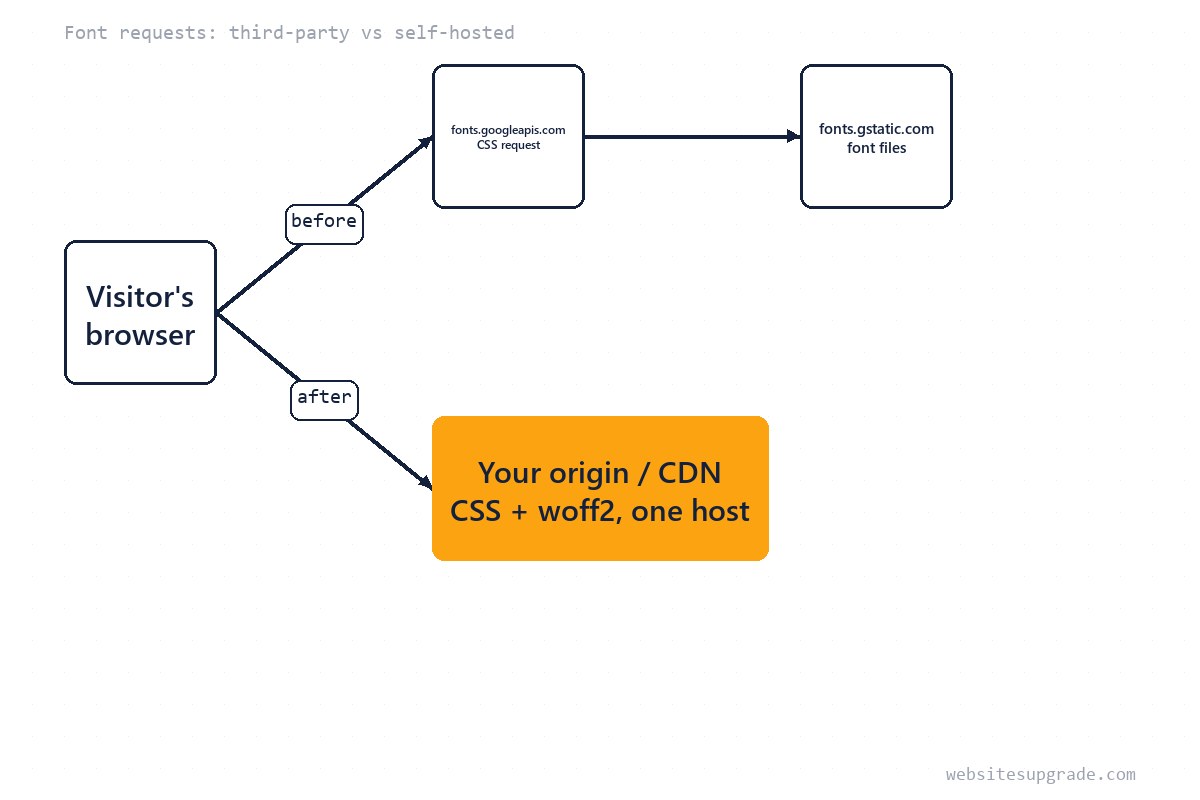
The single <link> to Google Fonts looks free and instant. It is neither: it silently adds two third-party hosts to your critical rendering path — fonts.googleapis.com serves a generated CSS file, which then points the browser at fonts.gstatic.com for the actual font data — plus a disclosure of your visitors' IP addresses to a third party.
Self-hosting is the rare upgrade that is fast, free, and strictly better for most small sites. This guide walks through the whole job: get the files, write the @font-face rules, wire up font-display and preload correctly, and verify. It pairs naturally with the triage in our slow-website guide, where fonts are step five.
What the Google Fonts embed really costs
For a visitor with a cold cache, a Google Fonts <link> adds, before the first styled text can render:
- DNS lookup + TCP + TLS to
fonts.googleapis.com, then a CSS request/response. - DNS lookup + TCP + TLS to
fonts.gstatic.com, then the font file request. - A second render pass if the font arrives after the text painted in a fallback (a layout shift if metrics differ).
The files themselves are small and fast — the cost is the connection chain and its position in the critical path. Two extra origins means two TLS handshakes your page blocks on. Self-hosting collapses the chain to your own origin, which the browser is already connected to and, on HTTP/2 or HTTP/3, multiplexes for free.
Get the woff2 files
Only one format matters in 2026: woff2, supported by every current browser. Options, easiest first:
- google-webfonts-helper (gwfh.mranftl.com) — pick the family and weights, download a zip of woff2 files plus a ready-made
@font-faceCSS block. The standard, least error-prone path. - From Google's own CSS: request the fonts.googleapis.com URL with a modern browser user-agent, and the CSS it returns contains direct
fonts.gstatic.comwoff2 URLs you can download. - From the foundry/source repo — useful when you want to subset (strip glyphs you never use) with a tool like
pyftsubsetfor even smaller files.
Put the files in a versioned path like /assets/fonts/. Download only the weights you actually render — most sites need 400, 700, and maybe one italic. Every skipped weight is bytes saved.
Write the @font-face rules
One rule per file. The critical detail is font-display:
@font-face {
  font-family: "Inter";
  font-style: normal;
  font-weight: 400;
  font-display: swap;
  src: url("/assets/fonts/inter-400.woff2") format("woff2");
}
@font-face {
  font-family: "Inter";
  font-style: normal;
  font-weight: 700;
  font-display: swap;
  src: url("/assets/fonts/inter-700.woff2") format("woff2");
}
font-display: swap tells the browser to render the fallback font immediately and swap when the file arrives — the difference between invisible text (a hard LCP hit) and a brief flash of fallback. MDN documents the alternatives: fallback gives the custom font only a short window to arrive before the fallback is kept permanently, and optional skips the custom font entirely on slow connections — the most aggressive, best for users on bad networks, worst if your brand requires the typeface.
Then swap your stack so the fallback is first in spirit: font-family: "Inter", system-ui, sans-serif; — and delete the Google Fonts <link> entirely, including any preconnect hints that pointed at it.
Preload the critical font — sparingly
Without preload, the browser discovers the font only after parsing the CSS that uses it. For the font your body text uses, add:
<link rel="preload" href="/assets/fonts/inter-400.woff2" as="font" type="font/woff2" crossorigin>
The crossorigin attribute is mandatory even on the same origin — font fetches are always CORS-mode, and a preload without it downloads the file twice. Preload at most your main text font; preloading several files pushes real content back in the queue and can make things worse. If your fallback stack is metrically close (system fonts usually are), skipping preload entirely and relying on swap is a legitimate choice.
Choosing a font-display value
font-display is a per-@font-face decision, not a site-wide one — your body font and a decorative display font can legitimately differ. The four useful values as of 2026:
| Value | Behaviour | Best for |
|---|---|---|
swap |
Fallback text renders immediately; custom font swaps in whenever it arrives | Body text — the safe default |
fallback |
Tiny invisible window, then fallback; swap only if the font arrives quickly | Fonts nice-to-have but not essential |
optional |
Fallback shows on slow connections; custom font may never be used | Maximum speed, brand-flexible fonts |
block |
Text stays invisible (briefly) waiting for the font | Icons/symbols where a fallback shows wrong glyphs |
When in doubt, pick swap for text faces and optional for anything decorative. The one value to avoid for body text is block — it recreates the invisible-text problem self-hosting was supposed to solve, just on your own origin.
Cache headers and verification
Font files are immutable once published — serve them with a long cache lifetime so returning visitors never fetch them again. On Apache:
<IfModule mod_expires.c>
  ExpiresByType font/woff2 "access plus 1 year"
</IfModule>
Then verify the whole job, not just that it "looks right":
- Open DevTools > Network, filter "Font", hard-reload: every font request should hit your domain only. If anything still calls googleapis/gstatic, a
<link>or@importsurvived somewhere — check the CSS for a stray@import url(...). - Confirm the woff2 responses carry
Cache-Control: max-age=31536000(or your equivalent). - Throttle to "Fast 3G" and watch text render: with
swapit should paint immediately in the fallback and swap once. - Re-run PageSpeed Insights on a representative page — "Ensure text remains visible during webfont load" should pass, and the third-party code audit shrinks.
When to keep the CDN instead
Self-hosting loses its edge in two cases: sites on platforms where you cannot serve static files at all (some hosted builders), and pages that already load ten other origins — where fonts are not the bottleneck, fix the bigger thirds first. For a genuinely global audience, serving fonts through the same CDN edge as your HTML (Cloudflare, Fastly) gets you the same proximity benefit without a third origin. And one honest trade-off: on Google Fonts, repeat visitors across other sites may already have the font cached; on your own origin every first visit pays the download — small, but real.
— Editorial team. Facts current as of 2026; we revise guides when the ground shifts.
Frequently Asked Questions
Is Google Fonts actually slow?
It is a third-party request chain: DNS + TLS to fonts.googleapis.com for a CSS file, which then triggers a second connection to fonts.gstatic.com for the font files. On a fast CDN-backed site the files themselves are quick, but the extra connection setup still delays first paint for new visitors.
Is self-hosting legal for Google Fonts?
Yes — fonts distributed through Google Fonts carry open licenses (OFL or Apache), which permit self-hosting. Keep the license file with your assets; that is the whole obligation.
Do I still need to preload after self-hosting?
Only for fonts used above the fold, and only if they are render-blocking your LCP text. <link rel="preload" as="font" type="font/woff2" crossorigin> fetches the file before CSS discovers it — useful for your main body font, wasteful if you preload everything.